Investigation Dashboard
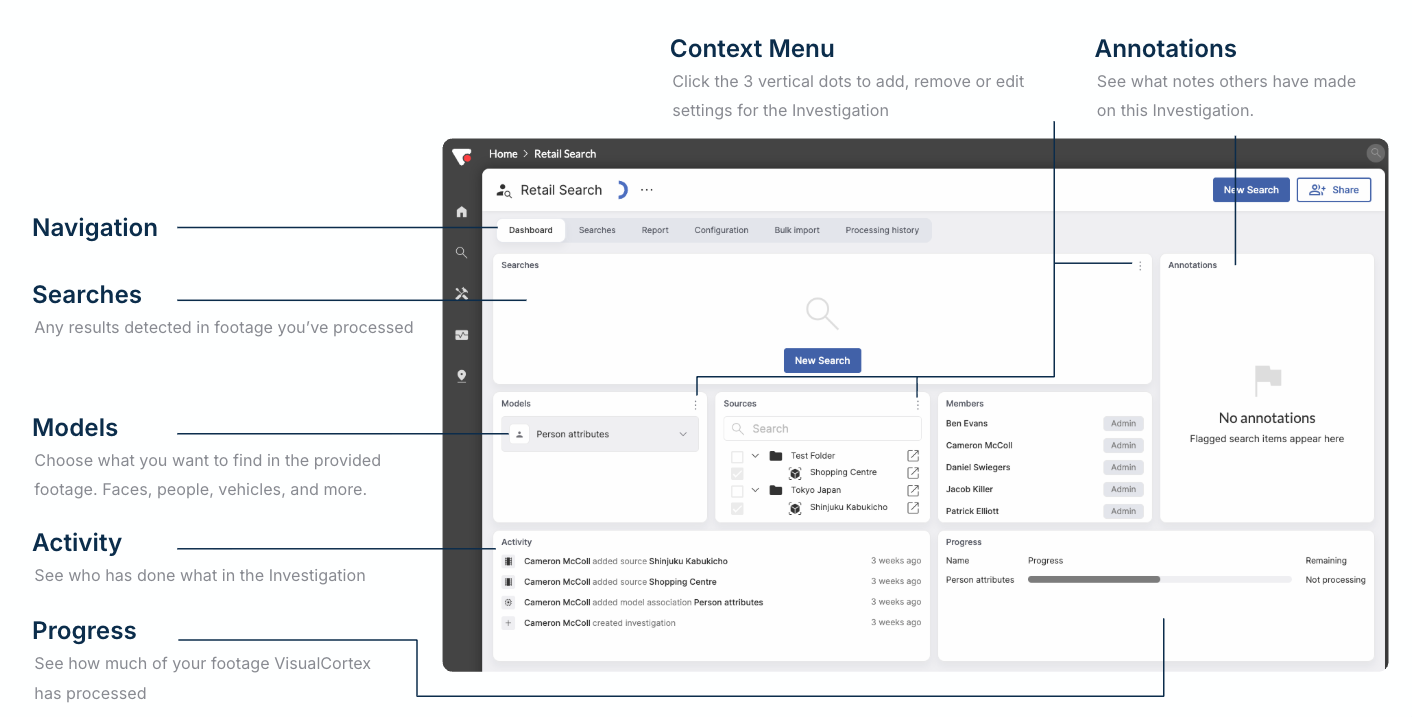
Navigation
Across the top of an investigation, there is a navigation bar, which has the items:
- Dashboard - The main home page for the Investigation
- Searches - A more detailed view of all Investigation searches
- Configuration - A more detailed view of all sources, as well as models
- Report - The Reporting Page for the Investigation
- Bulk Import - An easy way to import footage into the Investigation
- Processing History - A list of all jobs scheduled for all pieces of footage in the investigation
Sources
Sources are Video Sources, whether they be Live Video from live cameras, or Archived footage. With Archived Footage, you can either Bulk Upload footage, or add an existing Virtual Camera.
Note: Any Archived Footage added directly into an Investigation will have the same permissions as the Investigation itself.
Models
The models panel shows you all models which are currently enabled on this Investigation. If you add a model, it will process this model against all video in the Investigation Sources. For Live cameras contained in the Investigation, adding a Model to the Investigation will add the same Model to the Live camera itself.
Activity
All interaction in an Investigation is logged. Any user in the system who changes any part of an Investigation is logged here in the Activity panel. Items in the activity panel are clickable and the links will take you to the relevant part of VisualCortex.
Annotations
Annotations are the basis of your Report. Any time a user adds, edits or removes an annotation on a detection, or adds a note to a report, the log of that action appears in the annotation box.